
httpstat
CLI tool that displays detailed curl request statistics including DNS, TCP, TLS, and transfer times. Supports JSON output, SLO threshold checking, and works with standard curl options.
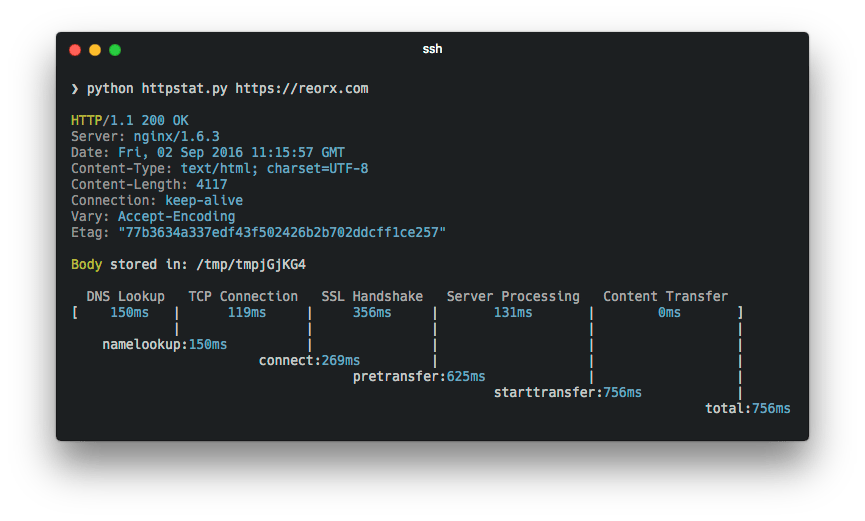
httpstat is a lightweight Python script that transforms curl statistics into clear, visual terminal output. It wraps around curl to capture and display comprehensive timing breakdowns for HTTP requests, making it invaluable for network performance analysis and debugging.
Key capabilities include:
- Detailed timing visualization — breaks down DNS resolution, TCP connection, TLS handshake, server processing, and content transfer times
- Structured JSON output — export results in JSON or JSONL format with a stable schema for automation and log pipelines
- SLO threshold monitoring — set performance targets and automatically detect violations with exit codes for CI/CD integration
- Flexible output control — show response bodies, IP addresses, transfer speeds, and save results to files for multi-step workflows
- Zero dependencies — single Python file with no external requirements, compatible with Python 3
- Full curl compatibility — accepts all standard curl options and environment variables
Perfect for developers diagnosing slow APIs, DevOps engineers monitoring endpoint performance, and QA teams validating response times during testing. The tool respects the NO_COLOR convention and includes built-in agent skills for AI-assisted performance diagnostics.
Features
JSON outputScriptable
Media
Pros
4- Visualizes curl statistics with detailed timing breakdown
- Provides structured JSON output for machine consumption
- Supports SLO threshold checking for performance monitoring
- Works with standard curl options for flexibility
Cons
2- Python script requires Python 3 interpreter
- Windows users are directed to a separate Go version
Related tools


Categories:
Activity score
56/100
Stars
6,218Forks
384Latest version
1.3.0Last commit
6 months agoFirst release
10 yearsLanguage
PythonLicense
MIT
Quiet lately: No commits in 6 months — this project might not be actively maintained.
Auto-fetched .
Recent releases
- 6 years ago
- 10 years ago
- 10 years ago
- 10 years ago
- 10 years ago
Similar to httpstat