
jqp
A terminal playground for running jq queries interactively with syntax highlighting, instant results, and support for APIs, logs, and JSON data sources.
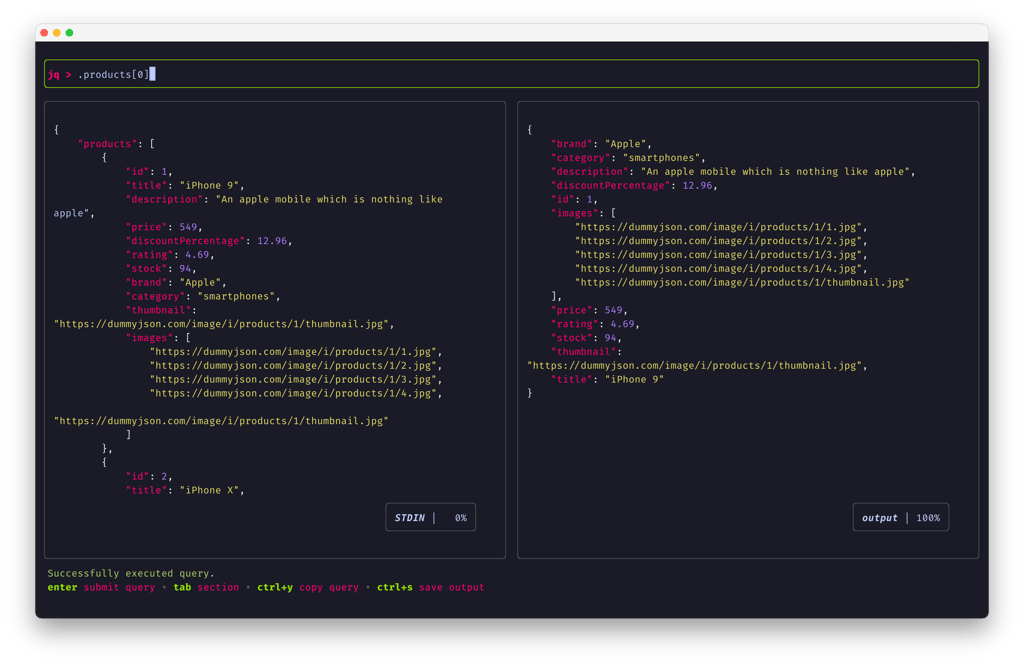
jqp is a terminal user interface (TUI) tool that transforms how you work with JSON data in the command line. Instead of running jq commands repeatedly and waiting for results, you get an interactive playground where you can modify queries and see results instantly.
The core strength of jqp lies in its interactive filtering capabilities. You can write and refine jq queries in real-time, testing different approaches without leaving the terminal. The tool supports the full jq query language through gojq, a Go implementation that ensures compatibility with standard jq syntax.
Key features include:
- Syntax highlighting for both input JSON and query results
- Automatic formatting to keep your data readable
- Multiple query execution with instant feedback
- Query history navigation to reuse previous commands
- Clipboard integration to copy queries and save output to files
- NDJSON support for working with newline-delimited JSON streams
- Customizable themes with light and dark options
- Keyboard-driven workflow optimized for terminal productivity
jqp excels when working with API responses, log files, or any JSON data source. Pipe data directly from curl, files, or stdin, then explore and transform it interactively. The tool includes configurable keybindings and theme customization through YAML configuration files, making it adaptable to your workflow preferences.
Install
$ brew install jqpFeatures
Shell features
Media

Pros
4- Interactive TUI for jq queries
- Syntax highlighting for jq queries
- Supports JSON and NDJSON input
- Configurable themes and styles
Cons
1- Requires jq to be installed separately if not using gojq implementation
Related tools


Activity score
52/100
Stars
2,847Forks
56Latest version
v0.8.0Last commit
8 months agoFirst release
4 yearsLanguage
GoLicense
MIT
Quiet lately: No commits in 8 months — this project might not be actively maintained.
Auto-fetched .
Recent releases
- 1 year ago
- 2 years ago
- 2 years ago
- 3 years ago
- 4 years ago
Similar to jqp