
Contour Terminal
Modern C++ Terminal Emulator.
Contour Terminal Emulator is a sophisticated terminal application available across multiple operating systems. Installation is straightforward through your platform's preferred package manager or by building from source.
Installation Methods:
- Windows 10+: Download the
.msiinstaller from the official releases page and double-click to install - macOS: Use Homebrew with
brew install contourfor quick setup - Fedora Linux: Install via DNF with
sudo dnf install contour-terminal - Arch Linux: Use Pacman with
sudo pacman -S contour - Ubuntu Linux: Download
.debfiles and install withsudo dpkg -icommand - Flatpak: Available through Flathub for containerized installation
Building from Source:
For advanced users, Contour supports compilation on UNIX-like systems (Linux, FreeBSD, macOS) and Windows 10+. The process uses CMake presets for streamlined builds. On UNIX systems, run the dependency installation script, then compile using preset commands like cmake --preset clang-release. Windows builds require Visual Studio 2019, vcpkg, and Qt6 setup. The source build approach offers customization options and allows installation to custom system paths with proper terminfo file configuration.
Features
Media
Pros
3- Available on Windows, macOS, and multiple Linux distributions.
- Supports installation via package managers and Flatpak.
- Can be built from source on UNIX-like systems and Windows.
Terminal capabilities
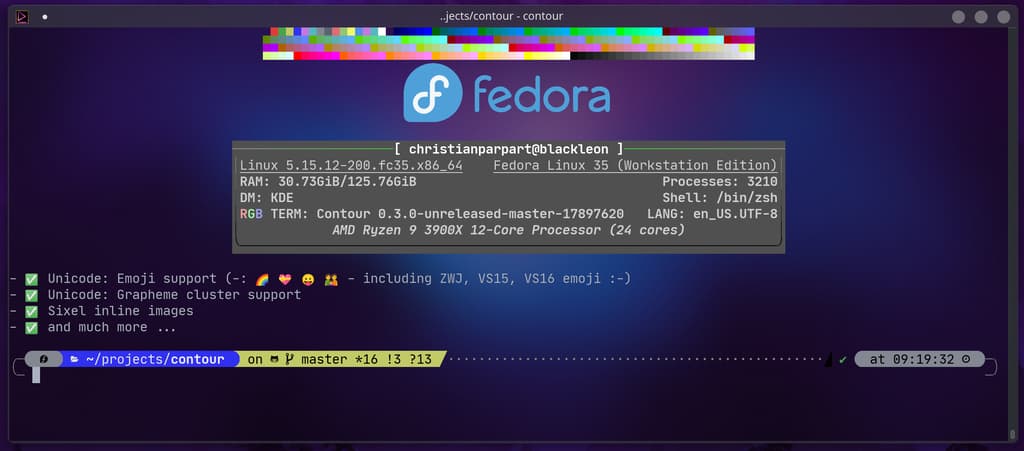
- GPU accelerated
- True color
- Sixel
- Kitty graphics
- —
- iTerm2 images
- —
- Font ligatures
- Styled underlines
- —
- OSC 52 clipboard
- OSC 8 hyperlinks
- Kitty keyboard
- —
- Synchronized output
- Shell integration
- Tabs
- Split panes
- —
- Dropdown mode
- —
- Built-in multiplexer
- —
- Wayland compatible
- —
Related tools




Tags:
Activity score
86/100
Stars
3,041Forks
154Latest version
v0.7.0.8982Last commit
3 days agoFirst release
7 yearsLanguage
C++License
Apache-2.0
Auto-fetched .
Recent releases
- 2 months ago
- 6 months ago
- 9 months ago
- 2 years ago
- 2 years ago