
discordo
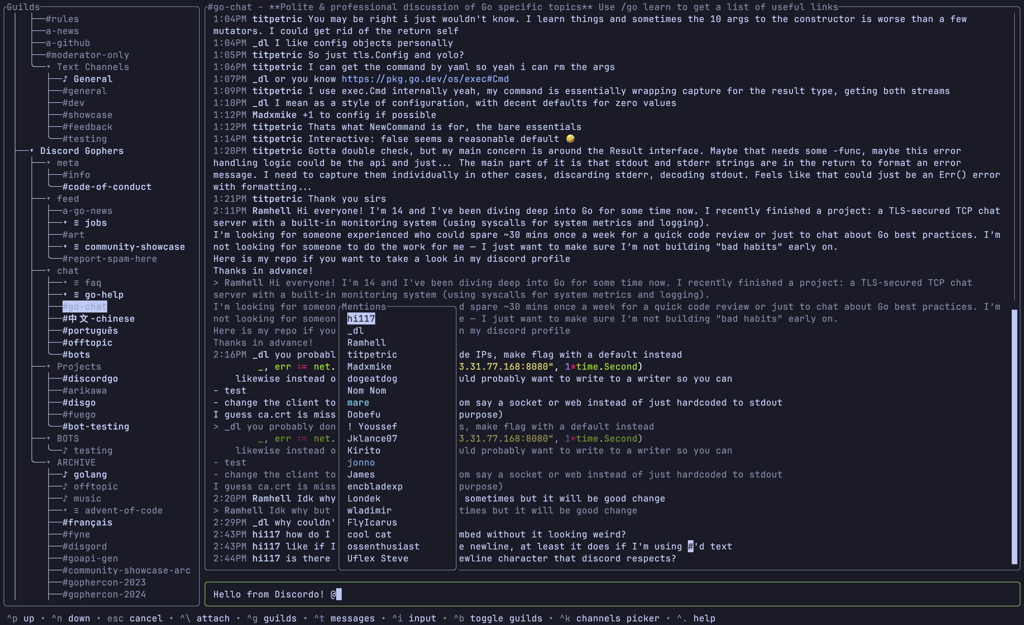
Lightweight terminal client for Discord with secure authentication, customizable keybindings, and cross-platform support for Windows, macOS, and Linux.
Discordo brings Discord conversations directly to your terminal with a lightweight and secure client built for developers and power users. Access all your servers, channels, and direct messages without leaving the command line.
Key features include:
- Multiple authentication methods: Log in via token, environment variable, or QR code for flexibility
- Cross-platform availability: Works on Windows, macOS, Linux, and FreeBSD with prebuilt binaries or package managers
- Fully customizable: Configure keybindings, themes, and behavior through TOML configuration files
- Clipboard support: Seamless integration with system clipboard, including Wayland support
- Active development: Regular updates with community support through Discord server
- Open source: Licensed under GPL-3.0 with transparent codebase
Install via package managers like Scoop, yay, or emerge, or download prebuilt binaries directly. The application stores configuration in standard system directories and uses sensible defaults out of the box. Perfect for users who prefer terminal interfaces or need Discord access in headless environments.
Install
Scoop
$ scoop install discordoFeatures
Config fileTrue color
Media

Pros
4- Lightweight terminal client for Discord
- Secure authentication options
- Customizable keybindings
- Cross-platform support for Windows, macOS, and Linux
Cons
1- Heavily work-in-progress, expect breaking changes
Related tools

Categories:
Activity score
89/100
Stars
5,827Forks
232Last commit
4 days agoFirst release
5 yearsLanguage
GoLicense
GPL-3.0
Auto-fetched .
Similar to discordo