
dust
Fast, intuitive disk usage analyzer that shows the largest directories and files with color-coded hierarchy visualization. No complex flags needed.
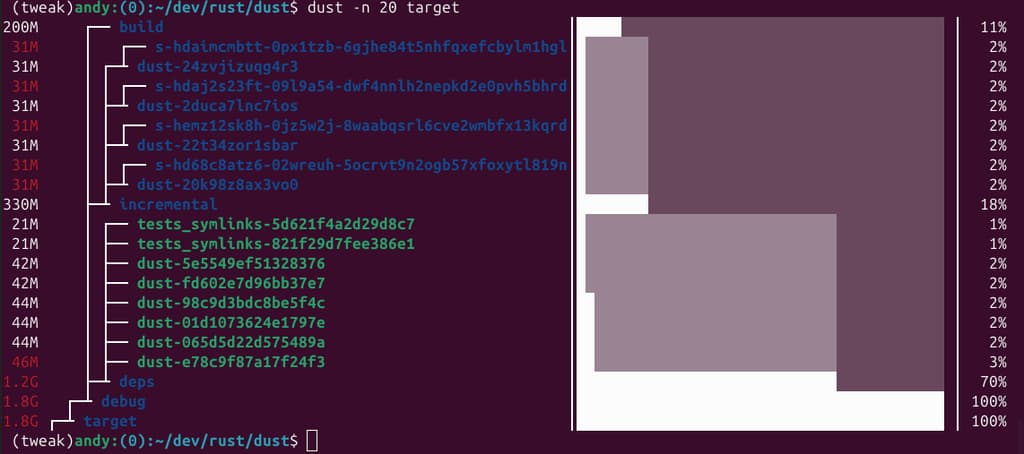
Dust makes it simple to understand where your disk space is being used. Unlike traditional tools that require piping through sort and head commands, dust provides an instant visual overview of your storage consumption.
The tool intelligently recurses through your directory tree to identify the largest subdirectories and files, displaying them with color-coded bars that represent both the hierarchy and disk usage patterns. The visual indicators show you at a glance which folders contain the most data and how that space is distributed.
Key features include:
- Smart visualization - Color-coded bars indicate parent-child relationships and relative disk usage
- No complex flags - Works intuitively without needing
-dor-hparameters - Flexible filtering - Filter by file type, size thresholds, regex patterns, or filesystem boundaries
- Multiple output formats - View results as ASCII bars, JSON output, or screen-reader friendly text
- Customizable display - Adjust the number of entries shown, recursion depth, and sort order
- Config file support - Save your preferred settings in
~/.config/dust/config.toml
Whether you're tracking down space hogs in development directories, analyzing storage usage across multiple paths, or simply understanding your disk allocation, dust provides the clarity you need without unnecessary complexity.
Features
Media
Pros
4- Intuitive disk usage analysis with color-coded hierarchy.
- Fast and efficient, showing largest directories and files.
- No complex flags needed for basic usage.
- Supports JSON output for machine-readable pipelines.
Cons
1- Snap version has limitations on file access.
Related tools



Activity score
91/100
Stars
12,494Forks
297Latest version
v1.2.6Last commit
30 days agoFirst release
9 yearsLanguage
RustLicense
Apache-2.0
Auto-fetched .
Recent releases
- 30 days ago
- 2 months ago
- 9 months ago
- 1 year ago
- 1 year ago
Similar to dust