
superfile
Modern Go-based terminal file manager featuring TUI, clipboard viewer, process list, metadata display, themes, and Vim keybindings for macOS and Linux.
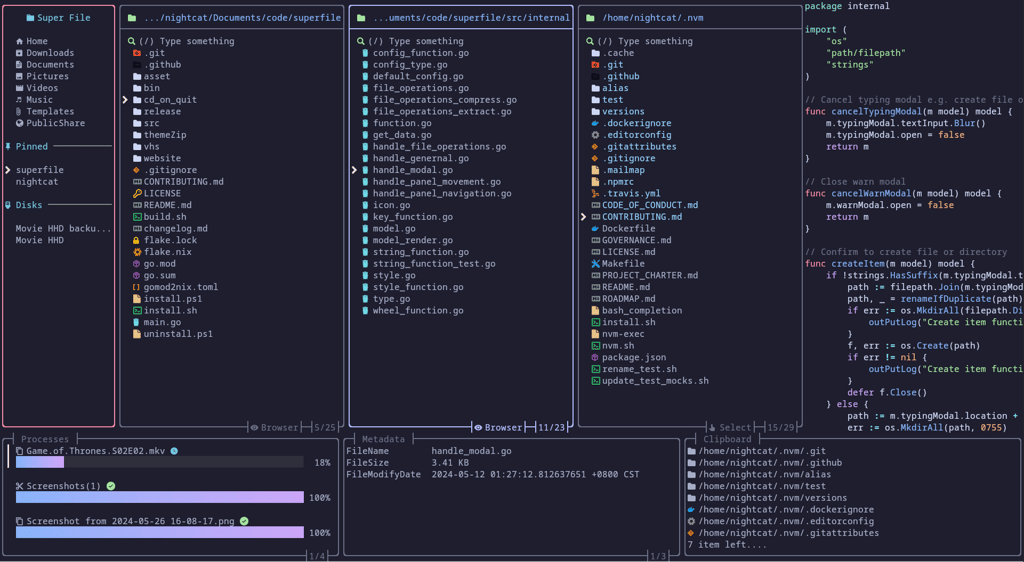
A modern file manager built in Go that brings powerful file operations directly to your terminal. Unlike traditional file managers, superfile keeps you in the command line environment where you work, eliminating context switching and boosting productivity.
Key capabilities include:
- Rich terminal interface with an intuitive visual design that makes navigation effortless
- Clipboard viewer for quick access to copied content without leaving the manager
- Process list to monitor running applications directly from the file manager
- Detailed metadata display showing comprehensive file attributes and properties
- Customizable themes and fonts to match your terminal aesthetic
- Vim keybindings support for users familiar with Vim's efficient navigation
- Complete file management including copying, moving, deleting, and organizing files
- Cross-platform support for macOS and Linux with Windows support in development
The tool is designed for developers and power users who spend significant time in the terminal and want a file manager that respects their workflow. All information displays within superfile itself, creating a unified environment for file operations without needing external tools.
Install
Winget
$ winget install --idFeatures
Config filePlugin systemTrue color
Terminal features
OSC 52 clipboard
Media



Pros
4- Modern Go-based file manager
- Features a clipboard viewer
- Includes a process list
- Supports themes and Vim keybindings
Cons
1- Windows support is not fully stable
Related tools
Alternatives
2




Categories:
Activity score
94/100
Stars
23,822Forks
877Latest version
v1.6.0Last commit
2 days agoFirst release
3 yearsLanguage
GoLicense
MIT
Auto-fetched .
Recent releases
- 4 months ago
- 9 months ago
- 10 months ago
- 10 months ago
- 1 year ago
Similar to superfile