
gitu
Terminal UI for Git with staging, branching, committing, rebasing, and more. Vim-like keybinds inspired by Magit, delivered as a single binary.
Gitu brings a powerful Git interface directly to your terminal, designed for developers who want Magit-like functionality without Emacs. This TUI tool handles all your essential Git workflows with an intuitive keyboard-driven interface.
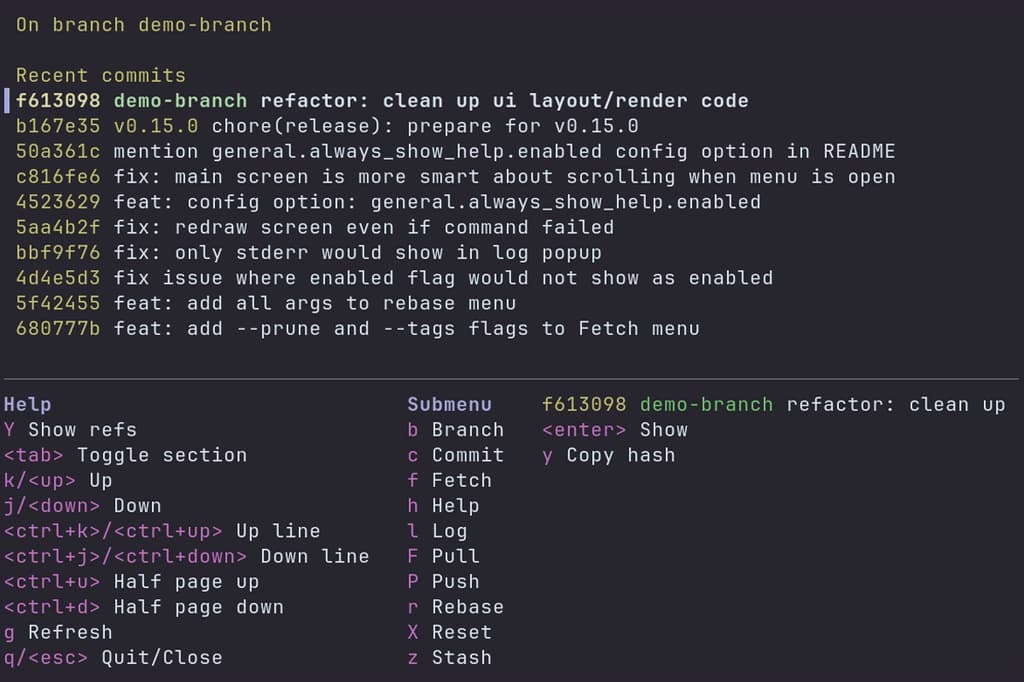
Key capabilities include staging and unstaging at file, hunk, or line level, viewing commits with detailed information, branching operations like checkout and branch creation, and committing with support for amendments and fixups. You can also fetch, pull, and push to configured upstreams, perform interactive rebasing with autosquash, reset with soft/mixed/hard options, revert commits, and manage stashes efficiently.
The keybinds closely mirror Magit while maintaining a Vim-like feel, making it familiar to users of both ecosystems. Press h anytime to access the help menu. Configuration is straightforward through TOML files, and editor selection respects standard environment variables like VISUAL, EDITOR, and GIT_EDITOR.
Gitu excels at simplifying repetitive daily Git tasks and serves as a lightweight, single-binary alternative to Magit. Whether you're staging changes, reviewing commit history, or managing complex rebases, this tool keeps you productive without leaving the terminal.
Features
Media

Pros
4- Provides a terminal UI for Git operations.
- Inspired by Magit's functionality.
- Supports staging, branching, committing, and rebasing.
- Delivered as a single binary for easy deployment.
Related tools
Alternatives
3




Similar to gitu